In this article
Last updated: · By the Televsio team
Telyqro is an IPTV player app for Android phones and tablets, Android TV and Google TV, Fire TV, Windows and Linux, and every paid Televsio plan comes with Telyqro Premium at no extra cost. With each line you buy or renew, you get a one-time link that unlocks Premium on one device for the same number of months as your plan: 1, 3, 6 or 12. You have 180 days to use it. The link arrives by email and on your order page in My Account.
This page explains what Telyqro does (only features we could check in the app’s published feature list and documentation), which devices it runs on today and which are still to come, exactly how the included Premium works, and how Telyqro’s approach compares with TiviMate and IPTV Smarters. If you already have your link and just want to get started, go straight to our Telyqro setup guide.
A player, not a channel list. Telyqro plays the playlist you give it and includes no channels of its own. Your Televsio line supplies the live channels, films and series; Telyqro is the app you watch them in. You can use your Televsio login in any compatible player, and Telyqro is simply the one we include.
What Telyqro is
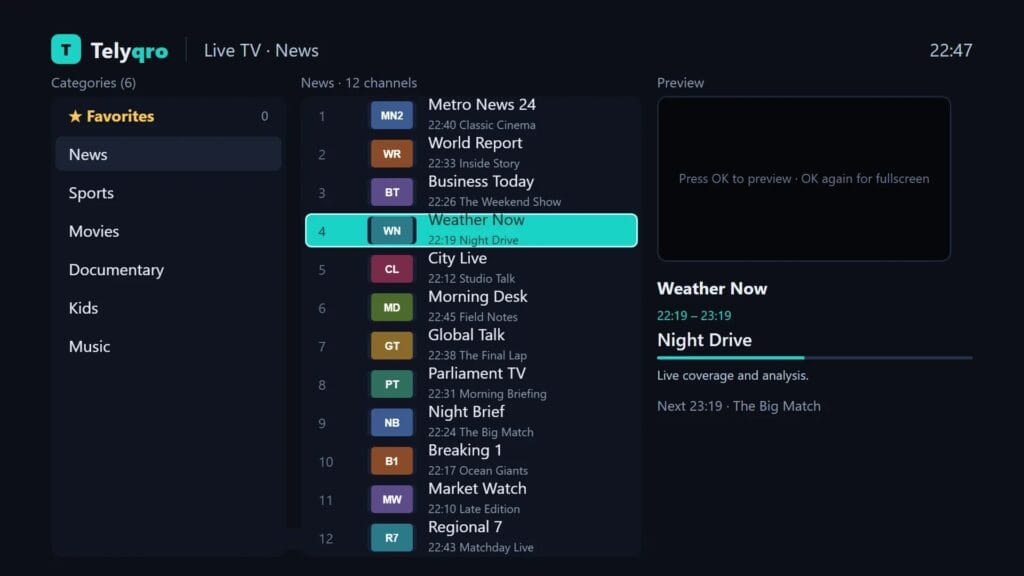
Telyqro is a player for your own IPTV playlists. You give it an Xtream Codes login (server address, username and password) or an M3U / M3U8 link, and it builds live TV, films and series sections from it, with a TV guide on top. It is designed to be driven with a TV remote as well as with a keyboard, mouse or touch screen, so the same app works on a living-room TV and on a laptop.
Three things set its approach apart from many players:
- Licensing per device. Every device that opens Telyqro gets its own Device ID and Device Key, its own 14-day free trial with every feature, and its own plan. Reinstalling the app doesn’t restart the trial.
- Playlists from the website. Instead of typing a long password with a remote, you can sign in on telyqro.com from your phone with the Device ID and Device Key and add the playlist there. It arrives on the TV by itself.
- Automatic backup. Favourites, settings and parental locks are backed up to Telyqro’s server and offered back when you install the app again.
Where Telyqro runs
The table below reflects the download page on telyqro.com and the app’s current release (version 1.0.8) at the time of writing. Telyqro is installed directly from telyqro.com, or with a Downloader code on TV devices, rather than from Google Play or the Amazon Appstore.
| Device | Status | How you install it |
|---|---|---|
| Android phones and tablets | Available | Download the APK from telyqro.com and open it |
| Android TV and Google TV | Available | Install Downloader from Google Play, then enter code 7619545 |
| Amazon Fire TV (Fire OS) | Available | Install Downloader from the Amazon Appstore, then enter code 7619545 |
| Windows 10 and 11 | Available | Run the installer from telyqro.com |
| Linux (x64 desktops) | Available | Download the AppImage and make it executable |
| Fire TV on Vega OS (the newest sticks) | Not supported | Vega OS doesn’t allow apps from outside the Appstore |
| macOS, iPhone and iPad | Listed as coming soon | Not available yet |
| Samsung (Tizen) and LG (webOS) TVs | Listed as coming soon | Not available yet |
If you watch on an iPhone, an Apple TV or a Samsung or LG TV’s own system today, Telyqro isn’t an option there yet. Your Televsio login works in other players on those devices in the meantime.
What Telyqro can do
Everything below is on Telyqro’s published feature list for the Android, Fire TV, Windows and Linux app. We haven’t run lab benchmarks of our own, so where a number appears it is Telyqro’s figure.
Live TV and the TV guide (EPG)
- Now and next on every channel row, with a progress bar for the programme on air.
- A full guide grid with a 30-minute time axis, a line marking the current time and programme details.
- The guide is found automatically: from an Xtream login, from the
url-tvgline of an M3U playlist, or from an EPG URL you set on the playlist. Compressed.xml.gzguides work too. - Background guide updates every 12 hours by default, adjustable to every 6 hours or once a day.
- Zapping like a set-top box: channel up and down within a category, typing a channel number on the remote, a previous-channel key, and a quick channel list over the picture.
- Live streams reconnect by themselves when they stall, and you can choose TS or HLS for live channels.
Catch-up
On channels where your provider keeps an archive, you can open past programmes from the guide, start the current programme from the beginning and jump back to live. Telyqro reads the Xtream archive information and the common M3U catch-up formats. Catch-up depends on the channel, so not every channel offers it.
Films and series
- Resume where you stopped or start over, plus a Continue watching row.
- Series pages with seasons and episodes, watched marks and “Continue S2E5”.
- The next episode starts after a 10-second countdown, which you can turn off.
- Audio track and subtitle selection.
Search, favourites and your own lineup
- Search matches any part of a name, ignores accents and works in any alphabet.
- Favourites for channels, films and series, plus favourite groups pinned to the top of the category list. Zapping from a favourite channel stays within your favourites.
- You can hide, rename and reorder groups and channels, and those changes survive playlist refreshes.
Watching more than one thing
- Multi-view: two or four live channels on one screen, with the sound on the tile you select.
- Picture-in-picture on Android (where the device supports it) and a small always-on-top mini player on desktop.
- An option to open a stream in an external player such as VLC or MX Player.
Parental control
A 4-digit PIN can lock any group, channel, film or series. Adult groups are locked automatically, and locked content stays out of search, favourites and the guide as well. After five wrong PINs the app makes you wait, up to 15 minutes.
Playlists, backup and languages
- Xtream Codes logins, M3U and M3U8 links, and M3U files uploaded on telyqro.com. A
get.phpM3U link is recognised and Telyqro offers to load it in Xtream mode. - Big playlists load in the background without freezing the screen. Telyqro states that 300,000 entries import in about 3.6 seconds on a desktop.
- Favourites, settings and locks are backed up automatically and can be restored on a new install.
- The interface is available in English, French, German, Spanish, Italian, Portuguese, Turkish, Russian, Arabic and Hebrew.
What Telyqro doesn’t do (yet)
Being clear about limits saves you time. Telyqro’s feature list includes no recording to storage and no separate viewer profiles. It isn’t on iPhone, iPad, Mac, Apple TV or the Samsung and LG TV systems yet, and it can’t be installed on Fire TV sticks that run Vega OS. If one of those matters to you, another player may suit you better, and your Televsio login works there too.
Why Televsio includes Telyqro Premium
The player shapes your whole experience: how fast the channel list opens, whether the guide is right, how easy it is to find a film. A good line in a frustrating app still feels like a bad service. Telyqro already gives every device 14 days for free, but after that it needs a paid plan. We’d rather you didn’t pay twice, so we cover that plan for as long as your Televsio subscription runs.
Telyqro is the player we recommend in every order email, and the Premium link is issued by us and checked by Telyqro when you use it. You’re never obliged to use it: TiviMate, IPTV Smarters and other Xtream-compatible players work with the same login.
How the free Telyqro Premium works
- One link per line. Every paid line, new or renewed, comes with its own one-time link in the form
https://telyqro.com/redeem/…. If your order includes more than one line, each line has its own link. - The months match your plan. A 1-month plan gives 1 month of Telyqro Premium, a 3-month plan 3 months, a 6-month plan 6 months and a 12-month plan 12 months.
- One device per link. You choose the device by signing in with its Device ID and Device Key when you activate. Once used, the link can’t be used on another device.
- 180 days to redeem. The link stays valid for 180 days from when it’s issued. The redeem page shows the exact “redeem by” date.
- The time starts when you activate. If the device already has Premium time, the new months are added after it ends rather than overlapping. Days left in the free trial aren’t added on top, so it makes sense to activate shortly before the trial runs out.
- Renewals bring a new link. When you renew, the new link adds the renewed months, stacked after the Premium time you already have.
- Free trials get no link. A Televsio free trial lasts hours, not months, and Telyqro already gives every device 14 days free, so a trial line has nothing extra to unlock.
- Where to find it. In your order email, next to the line’s username and password, and on your order page in My Account.
| Your Televsio plan | Telyqro Premium included |
|---|---|
| Free trial | None (Telyqro’s own 14-day free trial applies) |
| 1 month | 1 month, on one device |
| 3 months | 3 months, on one device |
| 6 months | 6 months, on one device |
| 12 months | 12 months, on one device |
Activating takes a couple of minutes: open the link on your phone or computer, sign in with the Device ID and Device Key that the app shows, and confirm. The app picks up Premium within about 30 seconds, or straight away if you restart it. The step-by-step setup guide covers installing, activating, adding your line and every error message you might see.
Telyqro, TiviMate and IPTV Smarters: how the approaches differ
We include Telyqro with our plans, so we’re not a neutral party. That’s why this comparison sticks to facts you can check and says plainly where the other two are the better fit. All three play Xtream Codes logins and M3U playlists with a TV guide, and your Televsio login works in each of them.
| Telyqro | TiviMate | IPTV Smarters Pro | |
|---|---|---|---|
| Devices | Android, Android TV / Google TV, Fire TV (Fire OS), Windows, Linux; Apple devices and Samsung / LG listed as coming soon | Android-based devices only: Android TV, Google TV, Fire TV, Android phones and tablets | A wider spread of platforms, including iPhone, iPad and Apple TV |
| Paid features | Premium per device; included with every paid Televsio plan | Premium bought separately from the developer | Depends on the version and platform; check the developer’s listing |
| Free period | 14 days with every feature, per device | Free app, with Premium features locked | Depends on the version |
| Recording | No | Yes, with Premium | Varies by version |
| Desktop app for Windows / Linux | Yes | No | Varies by version |
In plain terms:
- Pick TiviMate if you watch on Android TV or a Fire TV and want to record programmes. Our guide on updating the EPG on TiviMate helps you set up its guide.
- Pick IPTV Smarters if your household runs on iPhones, iPads or Apple TV, where Telyqro isn’t available yet.
- Pick Telyqro if you want one app across Android devices, Fire TV and a Windows or Linux computer, prefer to add your playlist from your phone instead of with the remote, or simply want the player that comes with your plan at no extra cost.
You can also mix: many people use one player on the TV and another on the phone. For a deeper look at the other two, read TiviMate vs IPTV Smarters Pro.
Getting started
- Choose your plan on the Televsio IPTV subscription page: 1, 3, 6 or 12 months, and 1 to 5 screens.
- When your order is confirmed, your login details and the Telyqro Premium link appear on the order page and in your inbox.
- Install Telyqro on your device, activate the link and add your line. The Telyqro setup guide walks you through each step.
Frequently asked questions
Is Telyqro Premium really free for Televsio customers?
Yes. Every paid Televsio line, new or renewed, comes with a one-time link that unlocks Telyqro Premium on one device for the same number of months as the plan. There is nothing extra to pay and no card to enter on telyqro.com.
Does Telyqro include channels?
No. Telyqro is a player and has no channels of its own. Your Televsio line supplies the live channels, films and series, and you add it to Telyqro with your Xtream Codes login or M3U link.
Can I use one Telyqro link on two devices?
No. Each link activates Premium on one device and then can’t be used again. If your order includes several lines, each line has its own link, so you can activate each one on a different device.
How long do I have to use the link?
180 days from when it’s issued. The redeem page shows the exact date. The months of Premium start when you activate, or after any Premium time the device already has.
I’m on a Televsio free trial. Do I get a link?
No. Free trials don’t come with a link, because Telyqro already gives every device 14 days free with every feature. When you buy a paid plan, its link is in your order email and on your order page in My Account.
What happens when my Telyqro Premium ends?
The app asks for a plan again on that device. When you renew your Televsio line, the renewal comes with a new link that adds the renewed months. You can also buy a Telyqro plan directly on telyqro.com.
Do I have to use Telyqro?
No. Your Televsio login works in any player that supports Xtream Codes or M3U, including TiviMate and IPTV Smarters. Telyqro Premium is included so you have a good player without paying for one separately.
About this guide
Written and maintained by the Televsio team, the people behind the Televsio IPTV service. The features on this page come from Telyqro’s published feature list and documentation, and we update the page when Telyqro adds a platform or changes how it works. If something here doesn’t match what you see, tell us through our Help Center and we’ll correct it.